HLTH Manage: CQC compliance and HR software

The inspector asks for a staff file. You open it.

In the new HLTH Manage, your staff files and CQC evidence sit in your service's own account, so they stay put when a manager leaves. We move your files in for you. From HLTH Compliance, the consultancy that supports CQC-registered providers.

Read the transcript

Music, with no voice-over. On screen, files, certificates and sticky notes float in the dark: Policies in one folder. Training certificates in another. Audits on paper. And your CQC evidence? Somewhere.

Introducing the new HLTH Manage. Your CQC compliance, all in one place. Staff, policies, audits and evidence. What's due, always in view. On screen, the Home page for Wrenfold House, a made-up care home, lists what is overdue and what is due in the next two weeks.

Bring it all in. Your shared drive, brought across. Every file sorted into place. Your folder names kept. On screen, the folders of a shared drive flow into Staff files, Training, Policies, Premises and safety, Audits and CQC evidence. Every file accounted for: 1,416 files brought in from Wrenfold House.

Staff files, complete. Policies, read and signed. CQC evidence, statement by statement. Search inside every document. On screen, a staff file with each check ticked, staff signing the safeguarding adults policy until all 14 have, evidence filed against each CQC quality statement with the gaps flagged, and a search for legionella that opens a risk assessment at the matching words.

Do the audit on your phone. Photos and notes, saved as you go. The next one is already scheduled. On screen, the monthly medication audit is recorded on a phone with two photos, and the next one is scheduled.

Coming soon. Manage starts working for you. Drop in a file. It reads it. Names it. Files it. Nothing is filed until you confirm. On screen, a photo of Callum Firth's basic life support certificate is read, its details are suggested for checking, and once confirmed it is filed to his record and its expiry, in 3 days, goes on the work list.

Coming soon. Your day, at a glance. On screen, a morning briefing: Good morning, Nina. Two things can't wait today. Hannah's supervision is three weeks overdue, and Callum's life support certificate runs out on Friday. The fire door check is due Thursday. Everything else is on track.

And a nudge before anything slips. On screen: Callum's life support certificate expires in 3 days. 3 staff still need to sign the infection prevention policy. The fire door check is due on Thursday. Little-used water outlets are 6 days overdue for a flush.

HLTH Manage. Your CQC compliance, all in one place. Founding places are open now. hlth-compliance.com/hlth-manage. Wrenfold House and everyone in this film are made up. Features marked Coming soon are in development.

65 seconds of the new HLTH Manage. Today's customers move across first. Founding places are open now.

Watch a care service move in

The care service is made up. The paperwork will look familiar.

  1. Day one

    It starts empty. We do the moving.

    We bring your files across and check every one arrived.

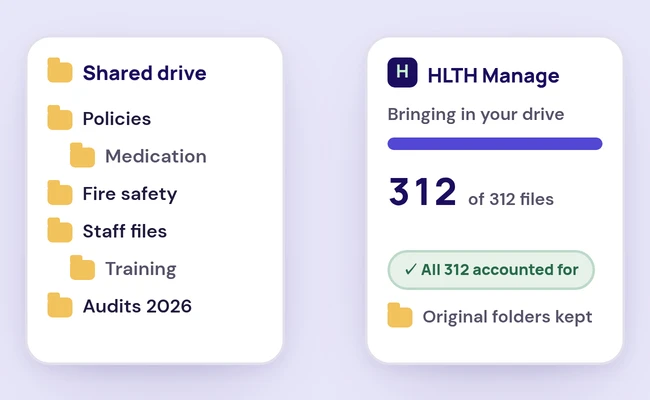
  2. HLTH Manage bringing in a shared drive: the drive's folders on the left, and on the right 312 of 312 files in, all accounted for, with the original folders kept.

    Moving in

    Your shared drive, folder names and all

    312 files in, 312 accounted for.

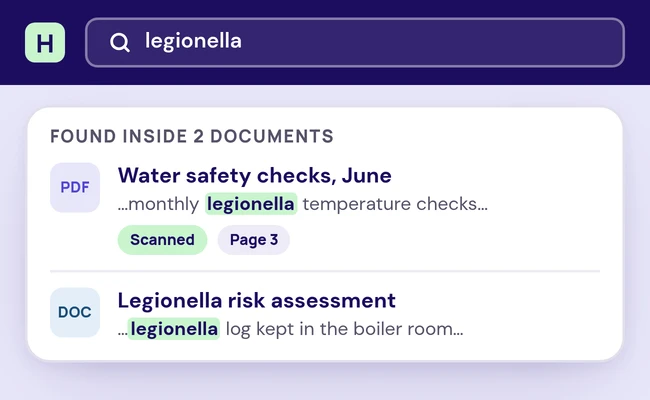
  3. A search for legionella in HLTH Manage finds it inside two documents: a scanned water safety check, on page 3, and a legionella risk assessment.

    Search

    Search inside every document, scans too

    Legionella turns up on page 3 of a scanned water safety check.

  4. The staff file of Amara Kofi, a senior carer: 8 of 8 checks in place and 1 due soon, a DBS recheck due in 3 weeks.

    Staff files

    Each staff file, checked against your list

    All eight checks in place. A DBS recheck is due in three weeks.

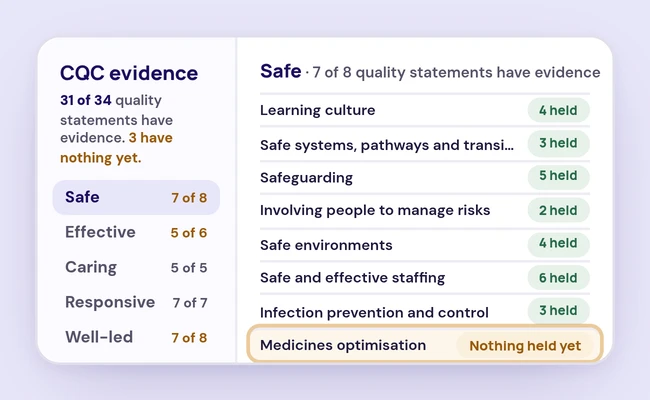
  5. CQC evidence in HLTH Manage: 31 of 34 quality statements have evidence and 3 have nothing yet. Under Safe, each statement shows how many items are held, and medicines optimisation has nothing held yet.

    CQC evidence

    Evidence for each quality statement

    31 of 34 statements have evidence. Medicines optimisation has none yet.

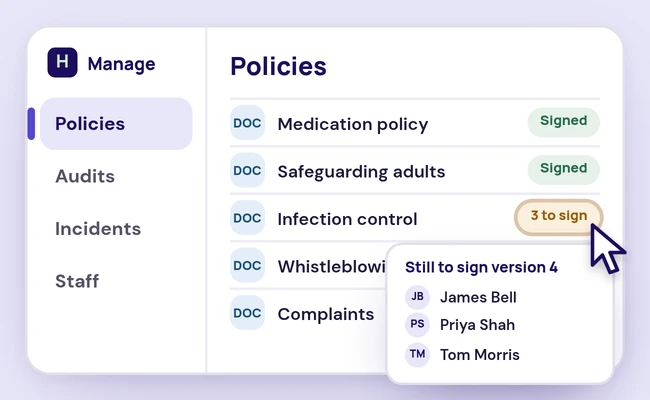
  6. The policies list in HLTH Manage: medication, safeguarding adults, whistleblowing and complaints signed, and infection control with 3 still to sign version 4: James Bell, Priya Shah and Tom Morris.

    Policies

    Who has signed each policy

    Three staff still need to sign version 4 of infection control.

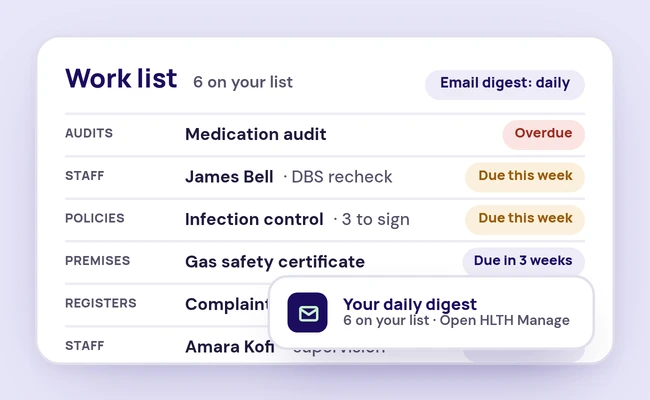
  7. A work list in HLTH Manage: a medication audit overdue, a DBS recheck and a policy to sign due this week, a gas safety certificate due in 3 weeks, a complaint action and a supervision coming up, and the daily digest email arriving.

    Day to day

    Everything that's due, on one list

    An overdue audit, a DBS recheck and a policy to sign. Each person can have it as a daily email, or not at all.

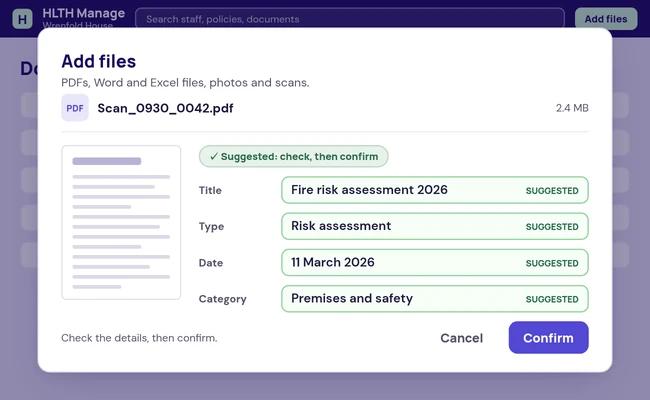
  8. An upload in HLTH Manage with its suggested details marked: title Fire risk assessment 2026, type Risk assessment, date 11 March 2026, category Premises and safety, and a Confirm button.

    Planned

    Upload a file and HLTH Manage suggests a home for it

    It fills in the details and suggests a category. A person checks each one and confirms it.

  9. Your service moves in the same way

    We do the move, and you can leave any month.

    Get the founding terms

The screens are animations of the new HLTH Manage. The names and records in them are made up.

Seven jobs, one at a time

HLTH Manage bringing in a shared drive: the drive's folders on the left, and on the right 312 of 312 files in, all accounted for, with the original folders kept.
312 files in, all 312 accounted for.

Moving in

We move your shared drive in for you

Your folders keep their names, so whatever lived in Fire safety is still in Fire safety. Then we check every file arrived.

A search for legionella in HLTH Manage finds it inside two documents: a scanned water safety check, on page 3, and a legionella risk assessment.
A search for legionella finds it on page 3 of a scanned water safety check.
Search

Find a word inside any file, even a scan

Search reads the text inside your files, scanned certificates and checks included, and the details on your records. A result opens in your browser at the matching words, on a computer or a phone, with nothing to download.

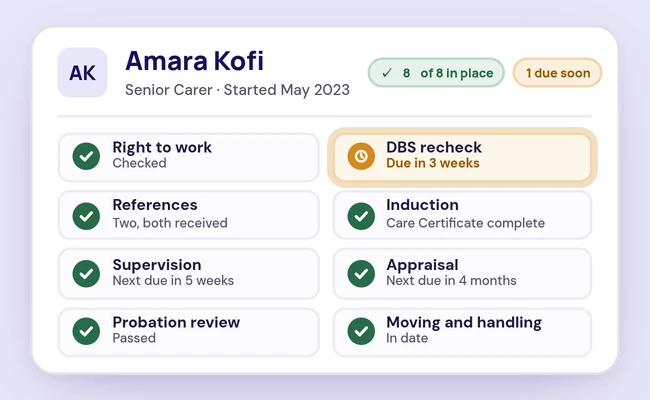
The staff file of Amara Kofi, a senior carer: 8 of 8 checks in place and 1 due soon, a DBS recheck due in 3 weeks.
Amara Kofi: eight of eight checks in place, and her DBS recheck is due in three weeks.

Staff files

Know whose DBS recheck is due next

You set the checklist, such as right to work, references and induction. Each person's file shows what's in place. Supervisions, appraisals, probation reviews and DBS rechecks each show their next due date.

CQC evidence in HLTH Manage: 31 of 34 quality statements have evidence and 3 have nothing yet. Under Safe, each statement shows how many items are held, and medicines optimisation has nothing held yet.
Three statements to go. Medicines optimisation is one of them.

CQC evidence

See which quality statements have no evidence yet

You file evidence against CQC's current assessment framework. Each quality statement shows what you hold for it.

The policies list in HLTH Manage: medication, safeguarding adults, whistleblowing and complaints signed, and infection control with 3 still to sign version 4: James Bell, Priya Shah and Tom Morris.
Infection control, version 4: James Bell, Priya Shah and Tom Morris still to sign.

Policies

See who still has to sign the new version

Every policy has a review date. Staff sign the version they read, so when version 4 goes out you can see who hasn't.

A work list in HLTH Manage: a medication audit overdue, a DBS recheck and a policy to sign due this week, a gas safety certificate due in 3 weeks, a complaint action and a supervision coming up, and the daily digest email arriving.
Six things on the list, and the medication audit is already overdue.

Day to day

The dates stop living in your head

Audits, premises checks and policy reviews share one calendar. Anything with a date, from a supervision to an action on a complaint, lands on your work list.

  • Registers for incidents, complaints, compliments, safeguarding, CQC notifications and risks
  • Audits recorded and scheduled, with the results attached
  • A daily email digest of your list, or none, as each person chooses
  • Export of any record, whenever you want it
An upload in HLTH Manage with its suggested details marked: title Fire risk assessment 2026, type Risk assessment, date 11 March 2026, category Premises and safety, and a Confirm button.
Fire risk assessment 2026, Premises and safety: each detail stays marked as suggested until a person presses Confirm.

Planned

Upload a scan, and HLTH Manage suggests what it is and where it goes

Suggested filing (planned): HLTH Manage reads an upload and suggests where it belongs, and a person confirms it.

The screens are animations of the new HLTH Manage. The names and records in them are made up.

Founding places are open now.

What founding customers get

For founding customers

Sign by 31 January 2027 and you get the standard terms, plus:

  • Your price stays the same for 36 months
  • A 30-minute review call with an HLTH consultant
  • Your first month after go-live is free

Organisations that sign after that date get the standard terms.

What every customer gets

  • No setup fee
  • We move your files in for you
  • Month to month, with no minimum term
  • Leave any month and take everything with you in a full export

HLTH Bespoke. A version of the new HLTH Manage, developed for your organisation. Not a rebadge. Quoted and contracted separately, outside the standard and founding terms.

Already on HLTH Manage?

You move across first. Your price and contract dates stay as they are. Nobody pays more for moving. Every job you do in HLTH Manage today still works in the new version. Nothing changes on your account until someone from the team has been in touch.


How the move works

What's in the first release

  • Your shared drive brought across, with your folder names kept and a check that every file arrived
  • Search inside your documents, and preview them in the browser
  • Evidence filed against CQC's current assessment framework
  • Documents and evidence in categories you set up for your service
  • Staff and HR files, with a completeness view for each person and dates for supervision, appraisal and DBS rechecks
  • Policies with review dates and staff acknowledgements
  • Registers for incidents, complaints, compliments, safeguarding, CQC notifications and risks
  • Audits recorded and scheduled, with premises checks and policy reviews on one calendar
  • Reminders on a work list and in an email digest
  • Export of every record, whenever you want it

Questions about HLTH Manage

Is HLTH Manage approved by CQC?
No. CQC does not accredit, endorse or approve any software. Using HLTH Manage doesn't change how CQC rates your service either. It keeps your evidence where you can find it when an inspector asks.
Does it file my documents for me?
Suggested filing is planned: HLTH Manage reads an upload and suggests where it belongs, and a person confirms it. The files from your shared drive come across in their own folders, and you can search inside every one.
I use HLTH Manage today. What happens to my account?
Nothing, until we contact you. Customers move to the new version one at a time. We count your records in both systems and check they match before your old access closes.
When can we start?
We haven't set a date for new customers yet. We'll share one once the first customer is live.

Speak to one of our experts

Clinicians, former CQC inspectors and a former Registered Manager.

What happens on the call

  1. Pick a time that suits you. The call is free and takes 15 minutes.
  2. You speak to one of our experts about your situation.
  3. You leave with a clear next step, before any big commitment.

A clear next step, before a big commitment

See it with someone from the team

Book a demo, and bring the last thing an inspector asked you for.

Speak to one of our experts

Clinicians, former CQC inspectors and a former Registered Manager.

A 15-minute introductory call to explain your situation, explore the right support and discuss the next step.